Documentation Index
Fetch the complete documentation index at: https://paxos-0ac97319-mintlify-fix-orchestration-example-1774904789.mintlify.app/llms.txt
Use this file to discover all available pages before exploring further.
The Stablecoin Conversions API will be deprecated.Paxos will migrate all active conversion rules to the Orchestrations API format by December 2025.Customers should transition to the Orchestrations API to ensure continuity of service. 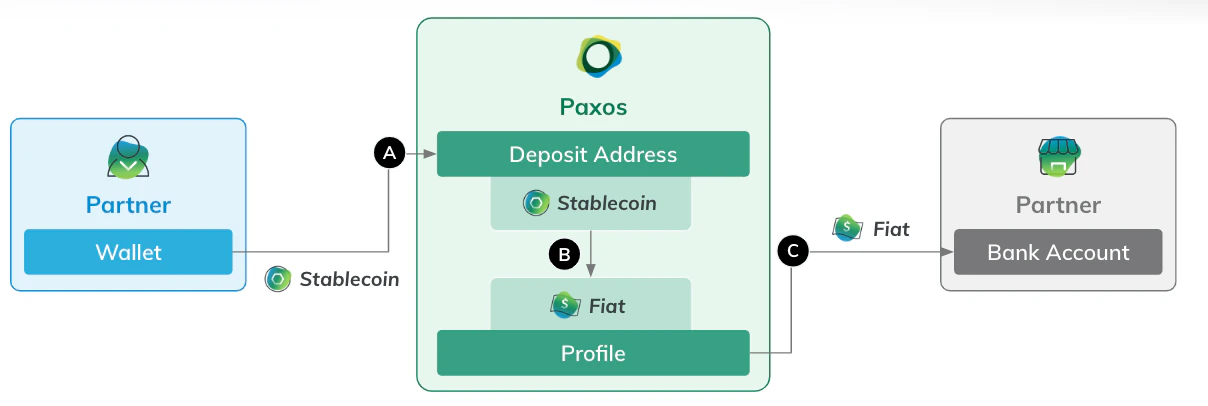 To redeem a Paxos-issued stablecoin, use Create Deposit Address to add the appropriate address on the Paxos platform. Next, initiate a stablecoin transfer from your external address (A in the diagram).
If you set
To redeem a Paxos-issued stablecoin, use Create Deposit Address to add the appropriate address on the Paxos platform. Next, initiate a stablecoin transfer from your external address (A in the diagram).
If you set conversion_target_asset to USD when creating the address, Paxos automatically credits your USD balance once the on-chain transfer is confirmed (B).
Then, use Create Fiat Withdrawal to send USD to your bank account (C).
- To redeem stablecoins you already hold on the Paxos platform, you can use Create Stablecoin Conversion to easily convert to USD. See the conversion guide for details.
- To send USD to your bank account, you’ll need to first save your external banking information on the Paxos platform. See the fiat withdrawal guide for details.
➊ Authenticate
Include the following scopes when authenticating:
funding:read_profile transfer:read_deposit_address transfer:read_transfer transfer:write_deposit_address
If you don’t see all the scopes when creating or editing API credentials, contact Support.
➋ Create Deposit Address
Use Create Deposit Address to add a wallet address to the designated Profile.
Include the appropriate crypto_network for the source stablecoin.
Set conversion_target_asset to USD to automatically convert the stablecoin to USD when the transaction is complete.
USDG on Ethereum
curl --location 'https://api.sandbox.paxos.com/v2/transfer/deposit-addresses' \
--header 'Content-Type: application/json' \
--header 'Accept: application/json' \
--header 'Authorization: Bearer {access_token} \
--data '{
    "profile_id": "0d3172c5-8840-4bae-bdd4-30688f0268fc",
    "crypto_network": "ETHEREUM",
    "ref_id": "r_usdg_8f91a9c5-0a6e-46dc-ad68-17bc8fb4eafb",
    "conversion_target_asset": "USD"
}'
PYUSD on Solana
curl --location 'https://api.sandbox.paxos.com/v2/transfer/deposit-addresses' \
--header 'Content-Type: application/json' \
--header 'Accept: application/json' \
--header 'Authorization: Bearer {access_token}' \
--data '{
    "profile_id": "0d3172c5-8840-4bae-bdd4-30688f0268fc",
    "crypto_network": "SOLANA",
    "ref_id": "r_pyusd_8f91a9c5-0a6e-46dc-ad68-17bc8fb4eafb",
    "conversion_target_asset": "USD"
}'
address and compatible_crypto_networks values from the response.
Also store the id to use when looking up transactions.
USDG on Ethereum
{
    "id": "078eb145-1bbc-4e1d-999d-92845dc31df4",
    "profile_id": "0d3172c5-8840-4bae-bdd4-30688f0268fc",
    "customer_id": "8cbc1177-d982-4750-a435-3c7f36245452",
    "crypto_network": "ETHEREUM",
    "identity_id": "00000000-0000-0000-0000-000000000000",
    "ref_id": "r_usdg_8f91a9c5-0a6e-46dc-ad68-17bc8fb4eafb",
    "address": "0xdCB1481afaabf9dAc1B2A8218067252D533Ae1a7",
    "account_id": "00000000-0000-0000-0000-000000000000",
    "conversion_target_asset": "USD",
    "compatible_crypto_networks": [
        "ETHEREUM",
        "POLYGON_POS",
        "ARBITRUM_ONE"
    ]
}
PYUSD on Solana
{
    "id": "8488990c-2cc0-441f-a26c-24d01c40a402",
    "profile_id": "0d3172c5-8840-4bae-bdd4-30688f0268fc",
    "customer_id": "8cbc1177-d982-4750-a435-3c7f36245452",
    "crypto_network": "SOLANA",
    "identity_id": "00000000-0000-0000-0000-000000000000",
    "ref_id": "r_pyusd_8f91a9c5-0a6e-46dc-ad68-17bc8fb4eafb",
    "address": "AufgJhf3DW83MUKgCKyrMyNjdCzhcy4LrcXcQsCDQRb2",
    "account_id": "00000000-0000-0000-0000-000000000000",
    "conversion_target_asset": "USD",
    "compatible_crypto_networks": [
        "SOLANA"
    ]
}
address included in the response from the previous step or from List Deposit Addresses.
Use List Transfers to check the status of transfer on the Paxos platform.
Using the type=CRYPTO_DEPOSIT and status=COMPLETED query parameters, in conjunction with crypto_tx_hashes, filters the results.
USDG on Ethereum
curl --location 'https://api.sandbox.paxos.com/v2/transfer/transfers?crypto_tx_hashes=0x768ac1e892985165885140c80f08ee0197ff6e175f9a9ed4b7f1b09c3b49baca' \
--header 'Accept: application/json' \
--header 'Authorization: Bearer {access_token}'
PYUSD on Solana
curl --location 'https://api.sandbox.paxos.com/v2/transfer/transfers?crypto_tx_hashes=3LnaTGt2hmLGFwRkZyh7bGPj8UyYFjJauTS2c4PZ6YQfqwBqTmN8Z6j3LhFrqgTRX7ZcyJrF2NrrJxztAX3n3uL9' \
--header 'Accept: application/json' \
--header 'Authorization: Bearer {access_token}'
COMPLETED, the USD balance updates.
USDG on Ethereum
{
    "items": [
        {
            "id": "d72363d9-52bb-4acd-ba35-b5b1e212ac26",
            "customer_id": "8cbc1177-d982-4750-a435-3c7f36245452",
            "profile_id": "0d3172c5-8840-4bae-bdd4-30688f0268fc",
            "amount": "100",
            "total": "100",
            "fee": "0",
            "asset": "USDG",
            "balance_asset": "USD",
            "direction": "CREDIT",
            "type": "CRYPTO_DEPOSIT",
            "status": "COMPLETED",
            ...
            "destination_address": "0xdCB1481afaabf9dAc1B2A8218067252D533Ae1a7",
            "crypto_network": "ETHEREUM",
            "crypto_tx_hash": "0x768ac1e892985165885140c80f08ee0197ff6e175f9a9ed4b7f1b09c3b49baca",
            "crypto_tx_index": "132",
            "auto_conversion": {}
        }
    ],
    "next_page_cursor": "CAESDAjJq_a3BhCI9LaXAhjwhN8N"
}
PYUSD on Solana
{
    "items": [
        {
            "id": "54235f7e-585c-4c08-b170-15bb10f74c1e",
            "customer_id": "8cbc1177-d982-4750-a435-3c7f36245452",
            "profile_id": "0d3172c5-8840-4bae-bdd4-30688f0268fc",
            "amount": "100",
            "total": "100",
            "fee": "0",
            "asset": "PYUSD",
            "balance_asset": "USD",
            "direction": "CREDIT",
            "type": "CRYPTO_DEPOSIT",
            "status": "COMPLETED",
            ...
            "destination_address": "AufgJhf3DW83MUKgCKyrMyNjdCzhcy4LrcXcQsCDQRb2",
            "crypto_network": "SOLANA",
            "crypto_tx_hash": "3LnaTGt2hmLGFwRkZyh7bGPj8UyYFjJauTS2c4PZ6YQfqwBqTmN8Z6j3LhFrqgTRX7ZcyJrF2NrrJxztAX3n3uL9",
            "crypto_tx_index": "4",
            "auto_conversion": {}
        }
    ],
    "next_page_cursor": "CAESDAi7n_a3BhCIkuKsAxisgt8N"
}
➍ Transfer USD to Bank Account
Use Create Fiat Withdrawal to send USD to your bank account.
You’ll need to first save your external banking information on the Paxos platform.
See the fiat withdrawal guide for details.
